Transforming Accessibility | A Conversation with Carolyn T.

Transforming Accessibility with Carolyn T The Accessibility Guy Podcast

Today’s blog post explores how organizations can make document accessibility part of everyday content creation instead of treating it as something to repair at the end.

It grew out of a conversation with accessibility consultant Carolyn T., whose experience in graphic design, document remediation, accessible templates, and staff training highlights an important lesson: many accessibility problems begin in the source document.

Video Guide

Think About Structure, Not Just Appearance

A document can look organized while lacking the structure assistive technology needs. Visual cues such as bold text, indentation, spacing, and color may communicate hierarchy to sighted readers, but they do not define that hierarchy programmatically.

Use the built-in platform tools to create structure:

  • Apply heading styles instead of making text look like a heading.
  • Use list tools instead of typing bullet characters manually.
  • Organize headings and subheadings in a logical hierarchy.

Think of the document as an outline. Its structure should remain clear even when someone navigates it without relying on the visual layout.

Accessible Charts Go Beyond Color

Color should never be the only way a chart communicates meaning. A legend that depends entirely on blue, green, or red can become difficult to interpret for some readers and may lose meaning when printed in grayscale.

Use additional cues such as patterns, direct labels, symbols, or other visual differences. When the chart contains important information, include a text description that communicates the key data or takeaway for someone who cannot see the chart.
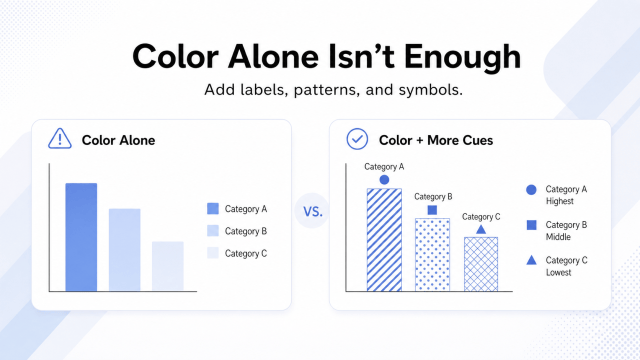
The goal is to preserve the chart’s meaning even when color or the visual presentation is unavailable.

Use Meaningful Document Metadata

Document properties help assistive technology identify a file. The document title, which is not the same as the filename, should clearly describe the content for screen reader users.

Set consistent standards for metadata such as author, subject, and keywords. For organizational publications, using the organization’s name as the author can provide more useful long-term information.

Templates and Training Go Together

Accessible templates give teams a reliable starting point and reduce repetitive accessibility decisions. A Word template can build in heading styles, document properties, table structures, accessible colors, and instructions while helping the organization maintain consistency.

Templates and training go hand in hand. Even a well-designed template can break down if teams don’t understand how to use it, preserve its structure, or add new content correctly. Pair every template with practical guidance so people know what the built-in accessibility features do and how to maintain them.

Train Teams to Understand the User Experience

Use short, focused sessions built around real documents. Demonstrate how a screen reader handles captions, headings, alt text, lists, links, and tables to make the guidance easier to understand and remember.

For example, authors are more likely to use heading styles correctly when they see how headings support navigation. They are also more likely to avoid relying on color alone when they understand how that can hide information from some users.

This approach helps teams connect accessibility practices to the user experience while building skills gradually.

Test the Full Experience

Use the document the way your audience might. Navigate headings, test keyboard access, review reading order, listen with a screen reader when appropriate, and check whether links and instructions make sense without visual context.

Practical testing often reveals problems that visual review misses. Replace vague directions such as “click over here” with specific instructions like “Select File, then choose Save As.”

Make PDF Export & Remediation Part of the Workflow

An accessible Word file can still produce tagging problems after export. Different versions of Word, operating systems, export methods, and document structures can affect the resulting PDF, especially when the file contains nested lists, footnotes, links, or content that spans pages.

Treat PDF creation as part of the accessibility workflow, not just a file conversion step. Use a consistent export method, test it with representative documents, and review the resulting PDF so you know how source-document choices translate into tags.

The tag tree reflects the document’s logical structure for assistive technology. Headings, paragraphs, lists, list items, and tables should appear in a meaningful order and use the correct tags. If content exports incorrectly, remediation may require rebuilding lists, adjusting reading order, replacing tags, or handling decorative content appropriately.

Work carefully when making structural changes because one edit can affect another part of the file. Save frequently and create backup copies before major changes. If the same export issue keeps appearing, fix the workflow at the source instead of repairing the same problem in every PDF.

Use Accessibility Checkers with Caution

Built-in accessibility checkers identify some technical problems, but a passing result does not mean a document is fully accessible. A document may pass automated checks and still contain problems, such as:

Use automated checkers as one part of quality assurance. Combine them with manual review, appropriate standards-based validation (The PAC tool), and user-focused testing before considering the accessibility work complete.

Empower an Accessibility Champion to Build Shared Expertise

An Accessibility Champion can help an organization establish standards, create templates, document procedures, train content authors, and support more complex accessibility needs.

The strongest programs use that expertise to build capability across the organization. When teams understand how to create accessible source documents, they can address many issues during content creation and reduce the amount of remediation required later.

This approach allows the Accessibility Champion to focus on guidance, quality, and complex cases while helping accessibility become part of the organization’s everyday workflow.

Transform Accessibility in Your Organization

A strong accessibility program gives people a clear, repeatable process they can use in everyday work. Focus first on the practices that have the greatest impact, such as accessible templates, meaningful document structure, consistent export methods, and practical testing.

Support the process with focused training and documentation, then refine it as recurring issues emerge. Keep the end user at the center of every decision so accessibility standards and tools serve their real purpose: giving people meaningful access to information.

When accessibility becomes part of the normal content workflow, organizations create more consistent documents, reduce preventable remediation, and build a stronger foundation for accessible content over time.

About Carolyn T.

Carolyn T.

Carolyn brings more than 20 years of graphic design experience and a unique perspective as both a document creator and remediator.

While working with a government agency navigating the Title II deadline, she built her unit’s document accessibility program from the ground up, developing an SOP, creating accessible Word templates, and training staff on accessible document creation.

She shares practical accessibility tips through her LinkedIn series, Document Accessibility by Design

About The Accessibility Guy Podcast

The Accessibility Guy Podcast explores real projects, practical challenges, and the ways accessibility laws, standards, technology, procurement, AI, education, and lived experience shape accessibility work.

The podcast features voices from across the field, including accessibility professionals, developers, designers, educators, government leaders, assistive technology experts, and people with lived experience.

Interested in joining the conversation? Register your interest to be a guest on The Accessibility Guy Podcast.

Related Articles

Responses

Discover more from The Accessibility Guy

Subscribe now to keep reading and get access to the full archive.

Continue reading